Showing posts with label reading. Show all posts

Wednesday, January 25, 2017

Exciting Times

January has been a busy month with much excitement! I am expecting to go out on maternity leave within the next two weeks and as a result have been working to get in one final lesson with many teachers and provide them with professional development they can use to continue their technology integration while I'm gone. I've supported teachers in their use of PicCollage, SMART Boards and Notebook 14, Seesaw, Kahoot, and navigating the new TestNav 8 software that students will use to take their SOL tests beginning in May. Additionally, I've worked to get student iPads on our new management system so that hopefully they can be more easily maintained while I'm out and limit the number of password and update pop ups that students have been experiencing. Oh, and we can't forget the three snow days! Below are some of the lessons I've been fortunate enough to be a part of this month.

Map Skills
Second grade teachers have been working to incorporate social studies and science content into their reading centers. As a result, I've created a couple of webquest type activities that help students explore these concepts further and deepen their understanding. I worked with Mrs. Davidson's second graders on a map webquest where they looked at how a legend, compass rose, and title provide information for a map. Students used Google Earth to locate major geographical features in the United States such as the Appalachian Mountains and Great Lakes. Students compared the location of major mountain ranges and practiced labeling features on maps.


Story Retelling
First grade students have been working on retelling stories by identifying the beginning, middle, and end of books they have read during guided reading. I had the opportunity to work with Mrs. Ahladas' and Mrs. Dingman's classes helping them create digital retellings in Seesaw. This learning experience allowed the teachers to hear each student retell a story and share the work with families. Additionally, saving the work to Seesaw allows teachers, families, and students to revisit the work throughout the year to monitor student progress.

Passion Projects
Mrs. Davidson's second graders have been working on their passion projects for several weeks now. This month they finished up their presentations - which range from posters, to Pixie projects, to booklets - and will have the opportunity to share with others next week. I loved being a part of this project because providing students with this opportunity built on their natural curiosities and created an experience that made learning meaningful for them. 


A student working on her Pixie presentation


Students working on their final products
Digital Citizenship
Four of the five fifth grade classes have completed their three digital citizenship lessons with me where we've focused on Acceptable Use, Private Information, and Netiquette. Students should now be aware of the impact sharing information digital can have on themselves as well as their family and friends. I've emphasized the notion that information shared digitally is easily spread. Students have been encouraged to err on the side of caution when sharing digitally and to consider if they would like the information they're communicating shared publicly. We've also explore the importance of clarity in digital communication. Without the help of body language and voice it can be challenging to interpret the tone of a digital message. While our lessons are "finished" these are concepts that students need continual reminders of at both school and home. 

Graphing
Kindergartners have been learning how to create tally charts and bar graphs to represent a set of data. To practice these skills independently, Mrs. Sinsabaugh and Mrs. Wagner's classes were given a series of winter images and a blank tally chart which they took a photo of in Seesaw. They then drew on top of the chart to create a visual representation of the data. After creating the tally chart, students then followed the same steps and created a bar graph. Using the information they recorded in the bar graph, they included an audio recording sharing information. A student sample can be found here. 
A tally chart in progress

A student constructs a bar graph

Animals and Ecosystems
Mrs. Hanneman's third graders have been learning about animals and the ecosystems in which they live. To apply concepts such as habitat, community, population, and environment and practice their writing skills, students conducted a brief research project where they learned about the ecosystem of an animal and then wrote a paragraph sharing their learning. Students were required to include some of the key terms to deepen their understanding of these concepts. Additionally, they practice paraphrasing while taking notes and developing thoughtful endings to their paragraphs. Here is an example of student work.
Students typing their paragraphs as a caption in Seesaw

Hard at work

Geometry Scavenger Hunt
Mrs. Gillam's fourth graders applied what they've learned about geometry to the world around them by completing a geometric scavenger hunt. Students were given a list of terms studied in class to find examples of in their classroom and the courtyard. They created PicCollages that included photos of the terms with the example highlighted and a label. Here are two examples of completed student work Student Sample 1 and Student Sample 2 This was a great way for students to review the terms and make connections between the content learned in class and real world. Additionally, it was a formative assessment for the classroom teacher to determine what concepts students had a firm grasp on and which needed additional instruction. 

Searching in the courtyard

Drawing on a photo to identify a term


Skip Counting
In younger grades, learning how to count is a basic skill that is essential to future math development. But how does a teacher have time to listen to 20 or more students count by 1s, 2s, 5s, and 10s? Seesaw provides a great platform for students to practice their counting skills that their teacher can review during planning or even while relaxing at home. First grade students took a photo of a hundreds chart and then used the drawing and record feature to demonstrate their ability to skip count by 2s, 5s, and 10s. Here is a student sample. In addition to providing a formative assessment for students, sharing the work with families on Seesaw allows them to see how they might be able to provide additional support to their children. All work, even that with mistakes, was saved so that student progress can be monitored over time. 


Digital Storytelling
Students in Ms. Hoggan's second grade class have been learning about the elements of fairy tales and crafting their own stories. I was fortunate enough to join them in class and teach them how to use the app Toontastic that they'll work with to tell their original tales. This learning opportunity was especially powerful to some of the reluctant writers in her class. They are excited about crafting a toon that will showcase their writing. Additionally, with the ability to create their own characters in the app, students are excited about putting themselves into their stories. 

Creating original characters

More original characters


Friday, October 28, 2016

Fall is in the Air

Summarizing
Third graders have been working hard on developing summaries of their reading. While retelling a story is sometimes a simple task, determining which events are most important to include in a summary can be challenging. The examples shared below involved students recording their summaries verbally in order to improve their verbal communication skills and to not be limited by the physical process of writing. 

One class of third graders created hand-drawn storyboards of the four most important events of the story "The Most Magnificent Thing" (a book they read on Epic! about persistence). Once their boards were complete, they took pictures of each frame, uploaded them to Shadow Puppet, and then recorded a summary of the book focusing on those four events. 

A Completed Storyboard

Recording the Summary in Shadow Puppet
A second class of third graders worked on retelling the story "Nate the Great San Francisco Detective" after a sequencing activity. The sequencing activity had many events that happened during the story, but students had to use their analytical skills to determine which ones were essential to the plot of the story. These students recorded their retellings in Seesaw. 
Recording a Summary
From Problem Solvers to Problem Makers
First graders have been working on solving part-part-whole story problems. This week several classes took their learning to a new level by creating story problems of their own. Students were given a part-part-whole template that they took a picture of in Seesaw. They then illustrated their story problem, wrote the parts and whole in the corresponding boxes, and then recorded their problem so that viewers would best understand their illustration. 

An Example of the Template and Beginning of an Illustration

Illustrating a Story Problem

Recording a Story Problem
Pumpkins
Kindergartners have been studying the changes pumpkins go through during the various stages of their lives. Recently they went on a field trip to a local pumpkin patch to learn more about pumpkins and see them in the various stages of growth. As a way for them to demonstrate their learning, students sequenced a series of six pictures of pumpkins in Pic Collage and then imported their collage into Seesaw where they recorded their knowledge. This activity was a great assessment of their knowledge of pumpkin growth, but also helped students with their verbal communication skills as they worked to describe what a pumpkin looks like at each of the different stages.

A Student Listens to Her Work
Explorers
In Social Studies, third grade students have been learning about explorers. After completing research to determine who sponsored a specific explorer, his contributions, and his exploration goal. Students created a recording in ChatterPix to share their own discoveries. The projects were uploaded to Seesaw so that students could learn from one another by viewing each other's work and share with their families. Click on the link below to view an example!


Eek! A Spider!
In the spirit of the season, first graders have been learning about spiders. Using their knowledge (and some impressive new vocabulary like arachnid), students created circle poems. I joined in on the fun by having students photograph their poems and record themselves reading them. This activity allowed students to practice their reading fluency. By creating it in Seesaw, students will be able to revisit their work later in the year and see how they've progressed! As they finished their recordings, students then used the note tool to write sentences about their new knowledge. 

A Student Photographs his Spider

A Student Practices Writing Skills Using the Note Tool

Monday, December 14, 2015

How fluent are you?

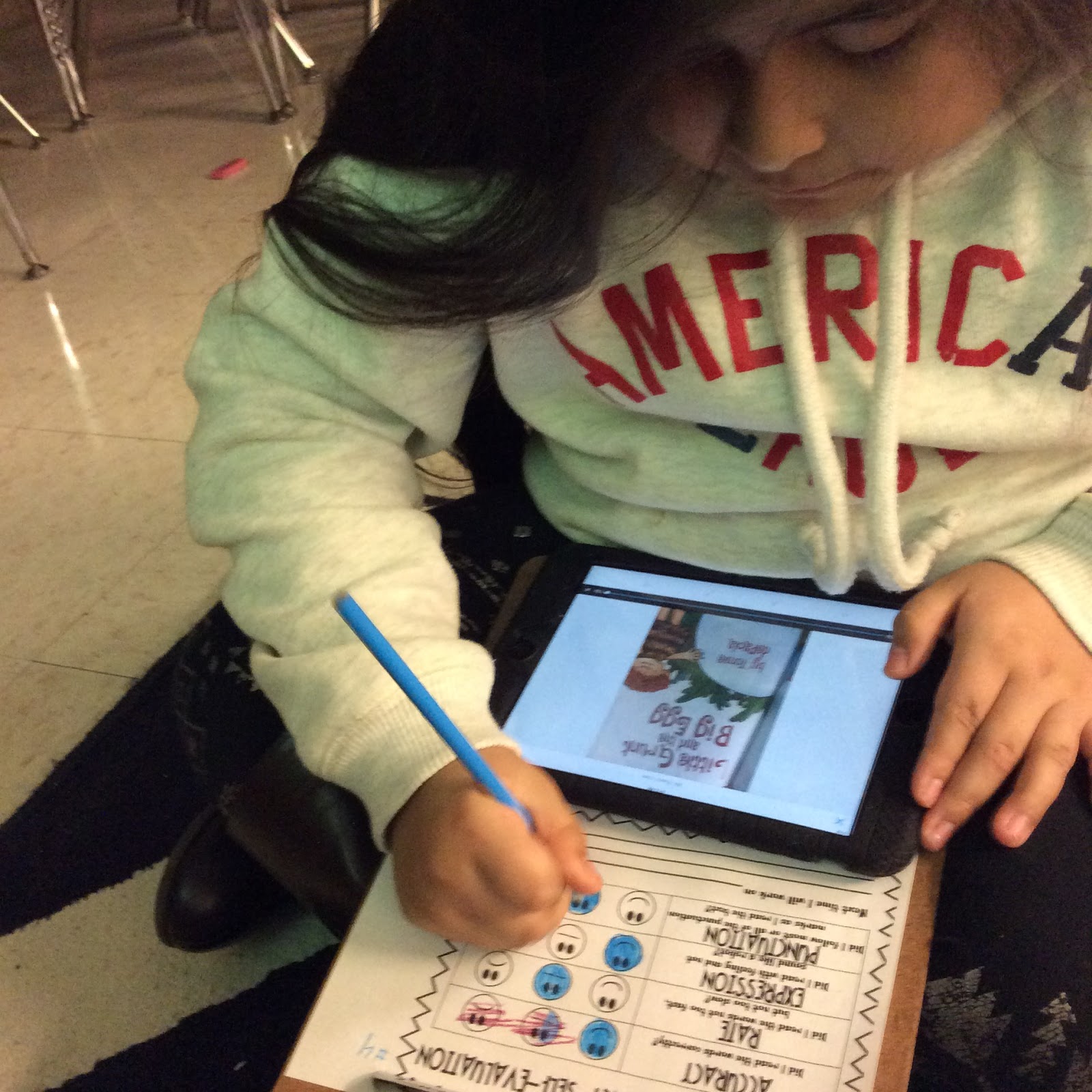
When is the last time you listened to yourself read? Why should students listen to themselves read? Over the last few weeks several classes at JGES learned about the different components of fluency, how fluency impacts reading comprehension, and how to self-assess their fluency.

For our purposes we broke fluency down into four areas - accuracy, speed, expression, and punctuation. After practicing what each component sounded like, students used the app Seesaw to record themselves orally reading a piece of text. Afterwards, students listened to the recording and assessed themselves on each of the four focus areas. Based on their self-assessments, each student set a goal that he will focus on over the next several weeks before repeating the process. 

Students using Seesaw to record a reader's theater

A student self assesses her fluency

Tuesday, November 17, 2015

First Grade Curriculum Night

On Thursdsay, November 5th first graders had the opportunity to bring their families to school to learn what it means to be a first grader at HCES. Attendees rotated through three rooms focused on math, reading, and technology integration. In each room, teachers shared what students have been and will be learning this school year as well as strategies that can be used at home to help students be successful.

Mrs. Davidson, Mrs. Trent, and I shared examples of student work that demonstrated how students are using technology to transform their learning. Parents viewed student work that integrated science and writing, heard students demonstrate their understanding of number concepts, and witnessed how technology can be used to enhance creative storytelling.

In addition to learning about how technology is supporting learning, students had the opportunity to teach their parents how to use the app ChatterKids! Using a picture of topics recently learned about (bats, pumpkins, apples, and American symbols) families worked together to create a movie showing what they knew about a topic.

I enjoyed meeting families and sharing about the meaningful learning happening in first grade at HCES. Enjoy the pictures below of families working to create ChatterKids!


Tuesday, November 10, 2015

Writing

Google Docs has become an unparalleled writing tool for first and fifth grade students. In Docs students are able to type like a traditional word processor. However, it allows for powerful collaboration that transform the learning experience. 

Multiple students can be in a file working on it at the same time. For example, in one fifth grade class, students were group and assigned different cell parts. They then researched the cell parts and collaborated in a Doc to share what they learned about their assigned part and learn about the other parts of a cell. 

Fifth grade students have also been using Google Docs to improve their reading comprehension skills by writing book responses. Once they've completed the responses, students share with one another and give feedback. Students are working to construct meaningful comments that help others grow as readers and writers. Examples of good comment beginnings include "I agree with you because...", "I disagree because...", "Can you explain ___ more? I am wondering..." In addition to students providing comments, I and the classroom teacher can provide instant feedback as students are working. 

Last week first graders began using Google Docs to type their writing and will spend time this week reviewing and commenting on their classmates' work. They will be working to provide constructive comments to improve their classmates' writing.

I have enjoyed collaborating with classroom teachers and students in getting their "Schoogle" accounts set up and their writing started. I am excited to see our students transform as writers with these great educational tools! 

Students are constructing their reading responses

A student reviews comments posted on her reading response

An example of a student's response and comments

Tuesday, October 20, 2015

Students at Work!

What an awesome week of technology integration at JGES and HCES! From book reviews to rhyming words to learning about explorers, students were busy learning and using technology in purposeful ways. 

Book Review Blogging
Fourth graders blogging

Last week I taught one class of fourth graders how to use Kidblog (a blogging platform) to write book reviews for their classmates. Students are writing the reviews which include a brief synopsis, character description, and opinions. In addition to being a great resources for finding good books to read, the blog enable students to develop their writing skills for an authentic audience - their classmates! 

The beginning of a student's post


Digital Storytelling
In science, first graders have been busy learning about bats, owls, and apples. After reading several books about bats, each student used the app Educreations (allows students to including drawings as well as voice recording) to draw a scene from one of the books and retell that part. In addition to sharing what they learned about bats, this form of digital storytelling had students practice their listening comprehension and verbal communication skills.

A student works on her bat illustration

Story Problems
In math, first graders have been working to solve addition and subtraction story problems. However, with the use of iPads and the app Educreations, students created their own story problems and then recorded themselves explaining how to solve the problem and write the number sentence that represented the story problem they created. Students wrote problems about cats, sharks, hats, mermaids, and much more! Through the creation of these story problems and explanation of how to solve, students used higher level thinking skills that demonstrate a deep understanding of the process of addition.
Two students creating their story problem

Explorers 
What do you know about Christopher Newport, Christopher Columbus, Juan Ponce deLeon, and Jacques Cartier? I'm sure these two classes of third graders at JGES can teach you something! After researching one of the four explorers, students created a ChatterPix that included the country that sponsored the explorer, what the goals of the explorer were, where he traveled, and other interesting facts. 

Students were excited about using the app and quickly picked up on how to take a photo of their explorer, record themselves sharing the information they learned, and save it to Dropbox for sharing. They demonstrated great teamwork by helping one another through the steps. 
A student shows another how to use ChatterKids

Two students view a ChatterKid

A student carefully considers what he'll say before recording

Taking photos of Christopher Newport

A student records her ChatterKid

After creating their ChatterKids, students saved their work to Dropbox. This allowed students to view their classmates' projects. Finally, they each shared something that they learned watching the videos using Padlet. Padlet is a digital "cork board" that allows users to post comments and view what others have posted. It's a great tool for sharing and communicating. Enjoy the pictures below of students watching one another's projects!


Letters, Beginning Sounds, and Rhyming Words
All kindergarten classes have been introduced to the iPads. These students are pros at handing the iPads properly and are learning how to search for apps. Of course there's more behind these lessons that just technology!
Students using Chalk Draw to practice writing their names

A student shows a classmate how to search for the Sound Sorting app. Students sort pictures based on beginning sounds. 

 A student practices sorting rhyming words as a SMART Board center

 
Owls are Interesting Creatures
Another way that first graders have shared what they've learned in science is by creating a PicCollage. On the collage, students include a picture of an owl puppet they each made in class and three facts about owls. This was a great way to tie science into writing!

A PicCollage Example